

Clean
The bands and filters exactly as measured and rounded: +5 on the dial is +5.00 dB, on both channels. Everything out is a straight line. The default.
 Neural audio processing
Legendary mastering EQ · 14-day trial
Classic curves. Precise control.

A faithful emulation of a legendary British mastering equaliser. Four stepped bands per channel, modelled position by position from the original hardware. Choose between Clean and Character modes, with broad shelves and distinctive bell curves.
VST3 · AU · macOS + Windows · standalone app on Windows
Play it
This is the plugin's own window, its rendered dials, switches and keys, every one of them live. Turn a dial, throw an X1.5 switch, step through the factory presets, unlink the channels, drag the nodes on the screen. Shelves where the dial says shelf, bells where it says bell, and in CLEAN the readout lands on round numbers, as the plugin does.

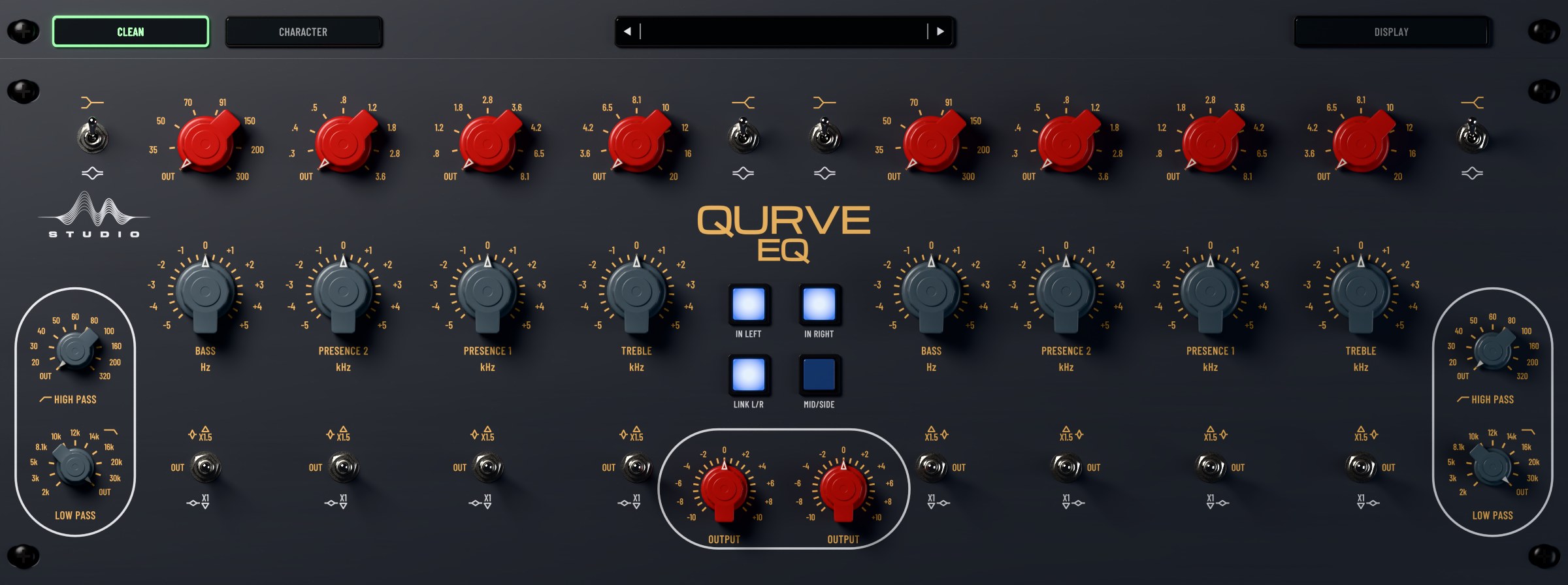
Drag a dial up or down · click a switch · drag the nodes on the screen · right-click (or long-press) DISPLAY for the legends
The screen draws textbook filters on the hardware's positions and steps, over a mix made up in your browser. In the plugin, the same display runs the measured model on your own music.
QURVE-EQ
QURVE-EQ faithfully recreates the distinctive tonal character and musical response of a renowned mastering equaliser, capturing the depth, warmth and shaping power that have made the original hardware a sought-after tool in professional recording, mixing and mastering.
At its core is a carefully modelled four-band design, with selectable frequencies and the unit's distinctive bell and shelving curves. Its X1.5 multiplier widens the boost and cut range and tightens the bandwidth, for more focused shaping.
Every curve is engineered to follow the original hardware's frequency response and tonal behaviour, preserving its characteristic shapes, its smooth high-frequency extension and its unmistakable approach to musical equalisation.
Two modes
The bands and filters exactly as measured and rounded: +5 on the dial is +5.00 dB, on both channels. Everything out is a straight line. The default.
Our unique ‘character accuracy’ mode. The whole unit as it measured, no rounding, with all its ‘imperfections’, colour and glory: the wire's gentle lift up top, the transformer's low end that moves with level, the amp's harmonics where you boost, and the small differences between its two channels.
The model
Stepped equalisers are honest machines. There is no in-between on a detented switch, so every position has to sound right on its own, and every one of them is a small curve of its own.
So we measured them all. Each frequency position, each gain step, X1 and X1.5, shelf and bell, left channel and right, swept across the whole audible range on one unit and fitted one by one. The amp that makes up the gain, its second harmonic where you boost, and the transformer's low end that moves with level are in there too.
The result is not a curve someone drew. It is the curve that unit makes, in your session.
Up close

01
IN LEFT and IN RIGHT are the unit's relay bypass. LINK puts both sides under one hand; MID/SIDE turns the left channel into Mid and the right into Side.

02
BASS: 35 to 300 Hz. PRESENCE 2: 300 Hz to 3.6 kHz. PRESENCE 1: 800 Hz to 8.1 kHz. TREBLE: 3.6 to 20 kHz. Overlapping ranges, so two bands can stack on one region.

03
Each band has its own switch. X1 for broad, polite moves. X1.5 for more gain and a tighter shape. OUT takes the band out of the circuit.

04
A stepped trim per channel, before the make-up amp, as on the hardware: turning it down cleans up the amp's second harmonic too.

05
A live analyser over the curve, with nodes you can drag. The readout says what each band adds where it sits: TREBLE 3.6 kHz SHELF X1 +5 = +5.00 dB.

06
Ten steps each, gentle 6 dB per octave slopes at the corners the unit really has, from a 20 Hz rumble filter to a 2 kHz telephone.
The details
Four bands, high pass, low pass and output on each side, linked or apart, L/R or Mid/Side.
BASS and TREBLE switch between a broad shelf and a bell; the presence bands are bells.
The unit's switches are stepped. Every change crossfades over 20 ms, so automation and dial turns never click.
The filters run at 176 to 192 kHz with linear-phase half-band filters, so a treble boost at 20 kHz keeps its shape at 44.1 kHz. Latency is reported to your DAW.
A spectrum analyser with draggable band nodes and a readout of what each band adds. Open it with the DISPLAY key.
Try every feature for 14 days, no account needed. One licence covers three computers, and you can release any of them from your account, at once.
Try it first
Everything open for 14 days on your computer. No account, no card: install, open it, press Start trial. A serial turns the trial into your licence at any time.
VST3 · AU · macOS + Windows · standalone app on Windows · Apple Silicon + Intel
Prices in US dollars · one payment, no subscription · pay with PayPal, by card or PayPal account · the key arrives by email
Questions about buying, the trial or moving your licence? Read the FAQ
